Multi option
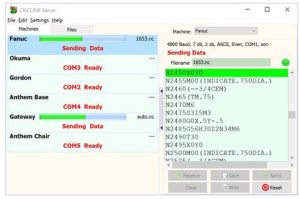
This allows many CNC’s to communicate at the same time. Multiple RS232 cables and com port hardware are required for this. We can help with the required hardware too.
The CNCLINK software in Multi mode can be driven manually by visiting the computer or by remote requesting part programs whilst stood at the CNC.
How the Remote Multi option works (No walking back and forth)
The general idea for remote requesting is that you send a small instruction from the CNC in the form of a part program.
eg.
%
O7777 (COMMAND PROGRAM) ;
N10 S1234 ; (where 1234 is the required program number)
M30 ;
%
When CNCLINK receives the N10S command it will automatically find the file 1234.txt and get ready to send it out to the CNC. Pressing the READ or INPUT on the CNC then calls the program in – Simples.
Remember though that this can happen on all the machines at the same time ‘in theory’ so this is why you need the Multi option and a cable/channel so that each machine has a clear passage for data.
When the program is proven the operator can just punch it out and CNCLINK will ‘know’ which machine/channel it came down and file it away with the correct program number. This can be the same location for send/receive or different folders and with or without creating overwrite backups.
Multi – Manual Mode (Visit to computer is required)
This mode is a half way situation designed to reduce any bottlenecks in workflow with people waiting for access to the computer. Each machine needs to have it’s own communications hardware channel and in this mode, each machine has it’s own editor window and you can toggle from one to the other just by clicking on the machine in the list.
So for example…
If someone is in the middle of writing a program and someone wants a program sending, you can click the the correct machine, send the program and click back to editing without waiting for the transfer to complete.